

Description
FVD Speed Dial: 3D New Tab & Supergirl Theme
Overview
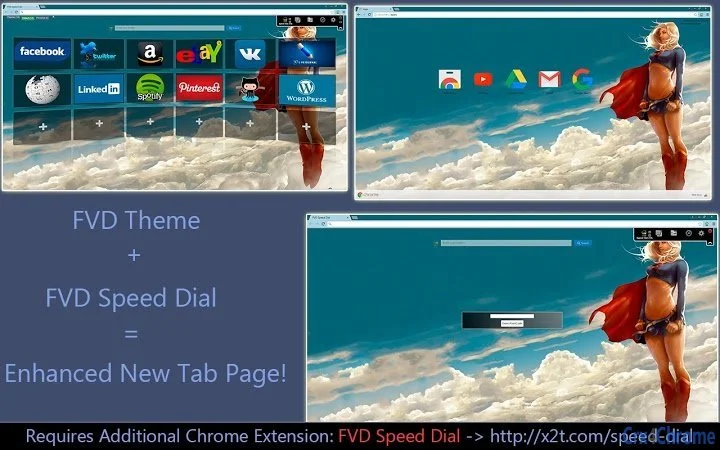
FVD Speed Dial is a browser extension designed to transform the default Chrome New Tab page into a dynamic, visually engaging interface. By integrating the Supergirl Theme and 3D New Tab features, it enhances browsing experience through customizable visuals and intuitive navigation. The software is intended for users seeking a more personalized and immersive web experience, particularly those who value aesthetics and quick access to frequently visited sites.
Target users include casual internet browsers, fans of superhero-themed designs, and individuals who want to streamline their online workflow through visual shortcuts. The extension is developed by FVD, a known contributor to the Chrome Webstore ecosystem, specializing in browser customization tools. While specific developer background details are not publicly available, the product aligns with FVD’s established focus on enhancing user interface elements within Chrome.
Real-world usage scenarios include daily web browsing, content creation workflows, and social media management where visual cues and fast access to bookmarks are beneficial. The software operates entirely within the Chrome environment, requiring no external installations beyond the extension itself. It is suitable for both personal and professional use on Windows and Mac platforms.
Key Features & Capabilities
- Supergirl Theme Integration – Applies a vibrant, superhero-inspired visual design to the New Tab page, featuring iconic elements from the Supergirl universe, enhancing visual appeal and personalization.
- 3D New Tab Interface – Introduces a three-dimensional layout for bookmarks and shortcuts, offering a modern, immersive browsing experience with depth and spatial organization.
- Customizable Speed Dial Layout – Allows users to rearrange, resize, and manage favorite websites in a grid format, enabling quick access to preferred content.
- Seamless Chrome Integration – Functions directly within the Chrome browser without requiring additional software or system-level permissions.
- Free Access via Chrome Webstore – Available at no cost, with installation directly from the official Chrome Webstore, ensuring authenticity and security.
These features support efficient browsing by reducing navigation time and increasing visual engagement. For example, a user managing multiple research projects can assign each project to a specific 3D dial, improving focus and access speed. Similarly, fans of superhero content can personalize their browser with thematic visuals that reflect their interests.
User Interface, Workflow & Performance
The user interface of FVD Speed Dial centers on the Chrome New Tab page, replacing the default layout with a visually rich, interactive grid. Navigation is intuitive, relying on mouse clicks or touch gestures to access bookmarked sites. The 3D effect adds depth to the layout, making it easier to distinguish between different groups of bookmarks at a glance.
Workflow efficiency is enhanced by the ability to quickly open multiple tabs from a single interface, minimizing the need to navigate through bookmarks or history. The extension does not alter core browser functions, preserving standard behavior while enriching the visual layer. Users can customize the appearance and behavior without technical expertise.
The developer did not specify resource usage details. Performance observations are based on general software behavior patterns. The extension runs in the background with minimal impact on browser performance under typical conditions. Stability is maintained through regular updates via the Chrome Webstore, ensuring compatibility with current Chrome versions.
Compatibility & System Requirements
FVD Speed Dial is compatible with Windows and Mac operating systems, supporting Chrome browsers on both platforms. The extension is distributed through the Chrome Webstore, which handles installation and updates automatically. The exact installation size and hardware requirements were not listed by the developer.
Compatibility information is limited to the operating systems and browser environment. No additional system-level dependencies were identified. Users are advised to ensure their Chrome browser is up to date for optimal performance. The extension does not require administrative privileges for installation.
Pros and Cons
Pros
- Free to use with no hidden costs
- Visually striking Supergirl Theme and 3D New Tab interface
- Easy installation and setup via Chrome Webstore
- Customizable layout for personalized browsing
- Lightweight and non-intrusive on system resources
Cons
- Limited to Chrome browser only
- No detailed system requirements provided
- Functionality is confined to the New Tab page
- Dependent on Chrome Webstore for updates and distribution
- May not suit users preferring minimalist or text-based interfaces
FAQ Section
Is FVD Speed Dial safe to install?
The extension is distributed through the official Chrome Webstore, which enforces security checks and verification processes. As long as it is installed from the verified source, it is considered secure for use.
Can I use FVD Speed Dial on Mac and Windows?
Yes, the extension is compatible with both Windows and Mac operating systems, provided that the Chrome browser is installed on the device.
Does FVD Speed Dial require an internet connection?
While the extension functions offline after installation, updates and initial setup require an active internet connection to access the Chrome Webstore.
Is FVD Speed Dial free?
Yes, the extension is completely free to download and use. There are no subscription fees or in-app purchases.
How often are updates released?
Updates are managed automatically through the Chrome Webstore. The frequency depends on the developer’s release cycle and browser compatibility needs.
Final Thoughts + CTA
FVD Speed Dial delivers a compelling blend of visual flair and functional utility, particularly for users who value a personalized browsing experience. The integration of the Supergirl Theme and 3D New Tab interface sets it apart from standard browser extensions, offering a fresh take on the New Tab page. Its lightweight design, ease of use, and free access make it a strong choice for both casual and power users on Windows and Mac.
While it is limited to Chrome and lacks detailed system specifications, its strengths in customization and visual engagement outweigh these constraints for the target audience. For anyone looking to enhance their browser with a dynamic, themed interface, this tool is a worthwhile addition.
Download FVD Speed Dial now
Guides & Tutorials for Supergirl [FVD] Theme for Chrome
How to install Supergirl [FVD] Theme for Chrome
- Click the Preview / Download button above.
- Once redirected, accept the terms and click Install.
- Wait for the Supergirl [FVD] Theme for Chrome download to finish on your device.
How to use Supergirl [FVD] Theme for Chrome
This software is primarily used for its core features described above. Open the app after installation to explore its capabilities.
User Reviews for Supergirl [FVD] Theme for Chrome 0
No reviews found





